A good question that few people probably ask themselves, in fact.
In our time, connecting to a Wi-Fi network has become almost indispensable, especially when you are outside the country and roaming risks costing a lot. Another reason as well: when you are in a place where the walls do not let the 4G/LTE mobile network through well and there… Wi-Fi proves necessary, even if you are in Switzerland with unlimited 4G/5G in your plan.
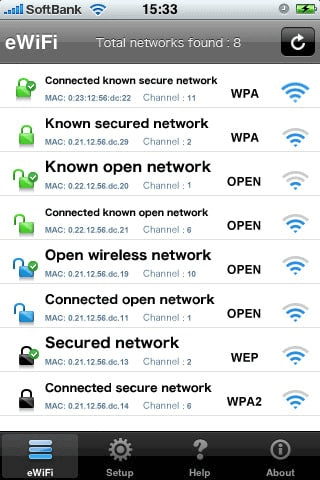
So, we have all done it. You look for an available network (SSID = the network name)… all secured with a little padlock… 1 alone without a padlock and you try it!
Caution: networks without a padlock mean these networks are accessible without a password, but that means neither that you will have Internet access, nor that it is without risk.
Indeed, an “open” network can either:
- Connect you to a temporary Internet address (without Internet access) to open in a 2nd window a portal asking for your details (name, phone, email, etc.). These are the ones most often found in hotel lobbies or airports.
- Be a decoy also called a “honeypot” that is there to attract hackers and divert them a little longer from the real network of the company/hotel/venue which, for its part, will be secured.
Open networks (whose traffic is not encrypted, by the way!) are found in cities, tourist spots, on squares, by the lake or in shopping centres. Their main official purpose is to give you Internet access, but their real ulterior motive is to take your data in exchange for Internet access. Because you either have to give them your mobile number and receive an SMS, or enter an email and contact details. The reason for this data exchange is supposedly to ensure your security and make sure you are not a machine. But in 2021, we now know well that data offered “for free” is most often resold or used without your knowledge. As the saying goes once again, “if it is free, the product is you!”.
Of course, open Wi-Fi is convenient and not necessarily always dangerous, although…
Once connected to a public “open” network, you are generally exposed to many risks such as attacks, since everyone can easily connect to it; note the multitude of spam you will subsequently receive because of your registration as well. Or unwanted SMS and many other little hassles. Moreover, an open network not being encrypted, all traffic to and from your device can be seen “in the clear” by hackers on the same network. So think of a VPN tool!
An important recommendation all the same: once disconnected from this type of network, manually edit the settings on your smartphone or computer so as NOT to let it reconnect to it automatically in the future. Why?
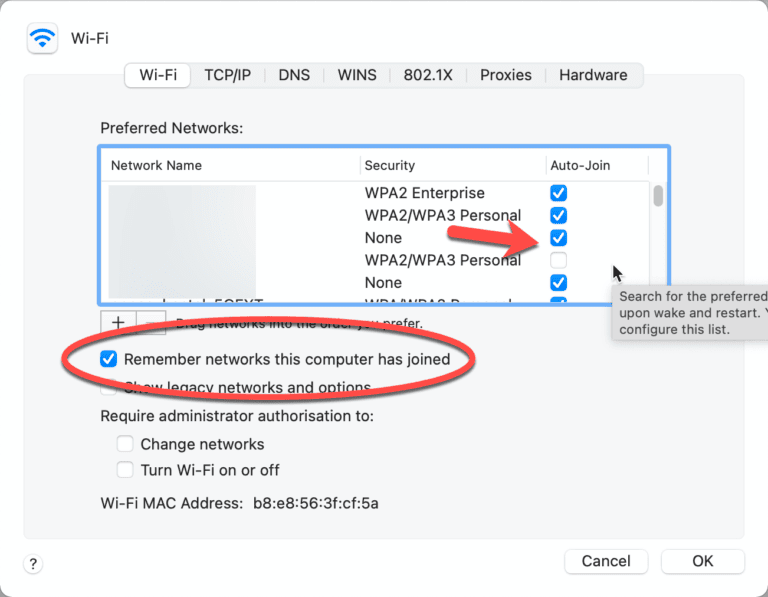
Because a malicious person could for example simulate the same open Wi-Fi network (same SSID) and on your next visit, rather than connecting to the Wi-Fi you think you are, you will connect to the hacker’s without even noticing… and that is like opening your front door wide!
So, open networks… yes, but with a few precautions. Personally, once finished, I delete them from my list of known networks.
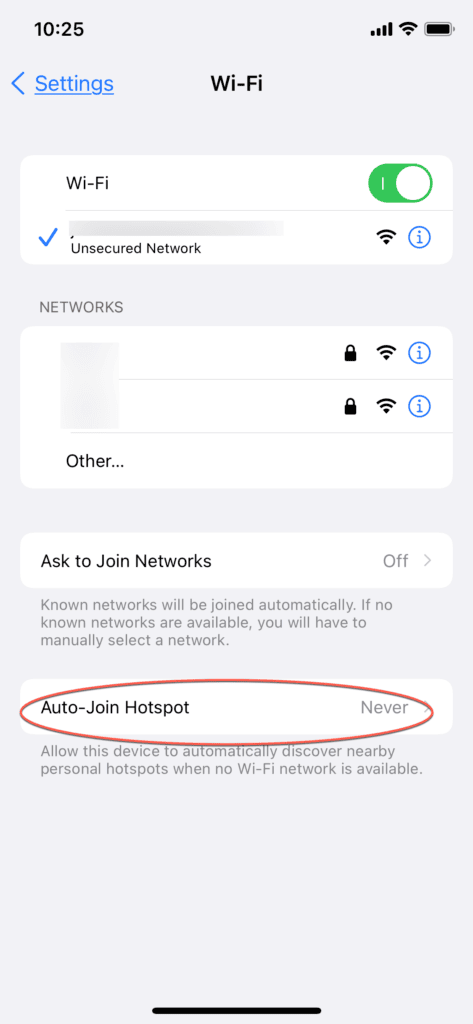
Added on 6.7.2021: Another smartphone feature: automatic connection to public and unsecured access points (hotspots). To be disabled, of course… we also recommend disabling the incessant connection prompts when the smartphone finds networks, because constantly scanning networks consumes more battery.
Fortunately, we also have secured networks, which today represent the majority of networks, since businesses and individuals alike have secured theirs over time.
Security can be found at various levels, the main ones being:
- A hidden SSID
- A key/code with the WEP/WPA/WPA2/WPA3 encryption protocols
- Access filtering by MAC address
- An additional portal
- A RADIUS authentication server…
The hidden SSID… a rather ineffective decoy and more of a source of problems. Indeed, although hidden, with simple tools a hacker or a specialist will be able to find it. Moreover, if you hide your Wi-Fi at home, there is a strong chance that some peripherals will not be able to connect to it or, worse, will connect and disconnect too often. It is good to choose a name (SSID) that gives no information about the type of router or your identity; that will limit the risks.
The key, or rather the encoding of the key, is important.
Initially, the first Wi-Fi networks had WEP encryption (Wired Equivalent Privacy), but it was relatively simple to crack and very quickly a new encryption mode named WPA/WPA2/WPA3 (Wi-Fi Protected Access pre-shared key) came to replace it.
WEP was therefore abandoned in 2004 in favour of WPA and WPA2 since 2006.
WPA mode is much more secure and for private use you will find WPA Personal TKIP, which encrypts your shared key, but in business, the WPA Enterprise version adds an extra level by calling on an authentication server as well.
WPA2 adds AES encoding (Advanced Encryption Standard) validated by the US government for the protection of sensitive data. That should be pretty good…
Note here that most private routers have a WPS function (Wi-Fi Protected Setup) which greatly simplifies the configuration of your Wi-Fi, but which also opens a very significant breach to which WPA and WPA2 are still very vulnerable. Disabling WPS is generally a wise decision. A better solution arrives with WPA3.
For those who do not know what this WPS is, it is generally a small physical button on the front or back of the router that allows “auto-configuration” of a secured Wi-Fi without going through a configuration interface.
Nowadays, when configuring a Wi-Fi network, the choice should fall on WPA2-AES, but it happens that to access older peripherals, you need to lower the security level a little. That is the justification for the choice often found of WPA-TKIP or WPA2-TKIP/AES to ensure that all your peripherals will be able to connect to your Wi-Fi.
It is important to understand that the protection of a Wi-Fi will depend on the one hand on its configuration, but also on the devices that will connect to it, which, if they do not support the encryption mode, simply will not be able to connect. As you will have understood, in public places we will therefore often find moderately secured Wi-Fi in order to allow as many people as possible to use them, such as hotel guests.
So yes… we now talk about WPA3 in the context of Wi-Fi 6, which makes it more difficult to steal your password (via a dictionary attack for example), but if your computer or smartphone does not know this encryption mode, no link will be possible. We therefore cannot put WPA3 at 100% for now.
Another point: you will often see on a router a feature called “MAC address filtering”. This is a feature that will limit the devices (MAC = unique identifier for each network device) that can connect to your network (but it is not without flaws) by only authorizing those that you validate yourself. The effect is that your friends will not be able to connect to your Wi-Fi without you adding them manually (tedious). You will have to go to your router, enter the administrator and password, detect the MAC address of the device to authorize and add it. Moreover, a real hacker can “spoof” the MAC address, that is to say pretend to be an authorized address and get in anyway. This method is constraining and the risk-benefit is not necessarily justified.
As a 4th point, it is possible to add a 2nd level of security via a portal (captive portal) that appears once the Wi-Fi connection is established, but which is a kind of safeguard, a neutral zone where you have to show credentials with a username and password to finally have Internet access. It is used in some hotels with the room number or for “Guest” networks… it is also hackable, but it is an extra measure.
The last point is the one companies use to secure Wi-Fi. It is especially in the context of identified employees, but it involves going through an authentication server called RADIUS which will only give you access when your identity (via a certificate and information) is verified. This is not something that is installed in every company or at least not necessarily in public places. It is a bit more complex — but not that much — to implement and it adds a better level of security.
To close the subject, a secured network is also a password (for the Wi-Fi and for access to the router) that is long and complicated enough (like those from operators when you receive your router). If you put your surname or numbers, it will be easy to crack. Favour something long with alphanumeric characters as well. You can generate a password here
Be careful all the same, because depending on the routers, a password such as 21wdEx)W%dVD3%aV will not always be accepted. Some brands do not allow all characters.
So in the end… yes, open Wi-Fi is cool, but watch out for the basic precautions. Secured networks do not guarantee you are “flawless”, because the WPA/WPA2 protocols have many known vulnerabilities.
100% security does not exist, that is certain, but it is possible to add extra barriers to slow down potential hackers.
Know all the same that most of the time we do not interest hackers, but if that is the case and you have data to protect, be vigilant, enable your firewall, encrypt your data, make backups and invest a little in a VPN client such as ExpressVPN for example.
We are happy to advise you.