
There are many video conferencing systems on the market today, and choosing one is not easy. It is clear, especially since the pandemic, that you have dealt with several of these applications — but which one to choose, and why? Here we offer a quick comparison between Zoom and Microsoft Teams, two solutions you have almost certainly already heard of. We will also present Jitsi, a video conferencing solution that stands out from its competitors on many interesting points.
The two platforms Zoom and Teams are similar in many respects. Indeed, both offer the basic features you would expect from a video conferencing application: HD video quality, background replacement, in-call messaging chat, browser access without an account, screen sharing…


There are nevertheless several points that set the two competitors apart. First, the interface is more intuitive and simpler on Zoom than on Teams. That can be an advantage if the video call you plan to hold includes people who are not comfortable with technology, or if you simply do not want to make life complicated. Zoom is therefore easier to use if you need a tool only for a few calls.
This more complex interface on Teams does, however, come with advantages — namely, full integration with other Microsoft tools. Teams can be linked directly to your Outlook calendar, and you can share files directly in the chat. Chats remain saved, and there is integration with Microsoft’s AI tool, Copilot. Long-term collaboration capability is greater with Teams. It seems better suited than Zoom for repeated team use, in a company for example.
Zoom does, however, integrate with third-party solutions such as Dropbox or Google Drive to share files during meetings, something Teams does not offer.
In terms of security, Teams offers so-called end-to-end encryption. Zoom, for its part, has had numerous security flaws where users were able to join meetings by “guessing” meeting codes they had not been invited to. Information is still processed on Zoom’s and Microsoft’s servers.
But features differ for each version, because yes, you have to pay if you want all the features. For individuals and businesses, Zoom offers a fairly limited free version. Teams also offers a free version for individuals, but businesses — regardless of size and needs — will have to pay.
The free version of Teams for individuals and what it includes:

Teams offers several plans for businesses:
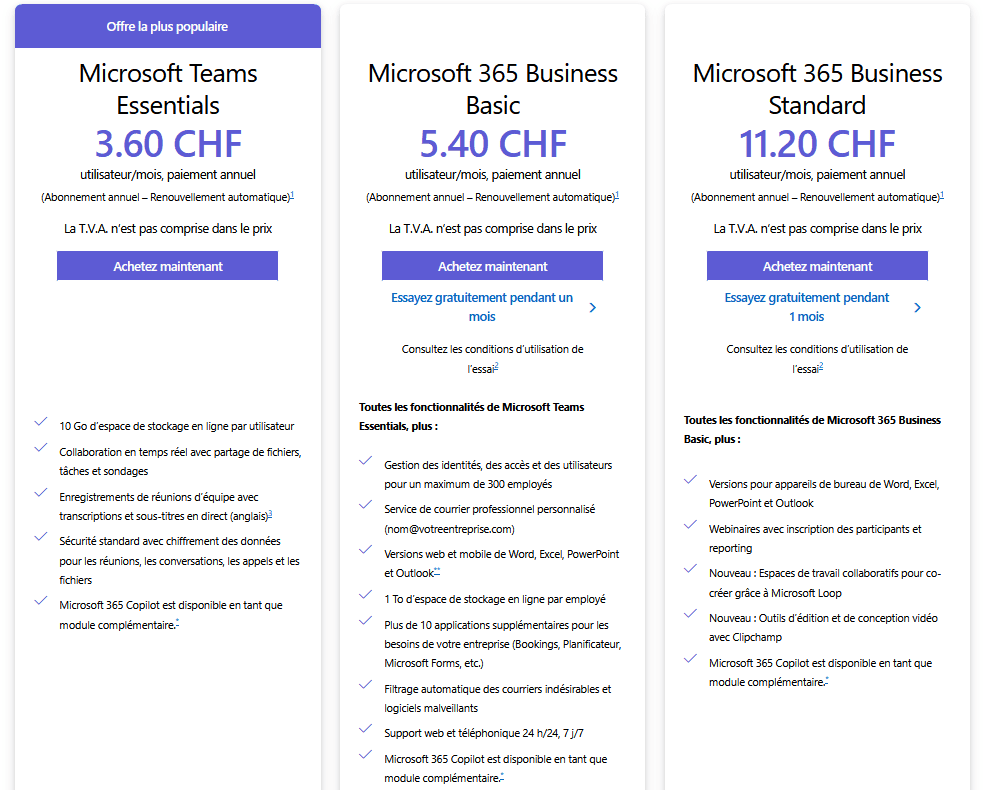
It is worth noting that apart from the “Essentials” version, Microsoft sells Teams with the full Office 365 suite. It is clear that Teams is designed to work hand in hand with the other Microsoft Office tools.
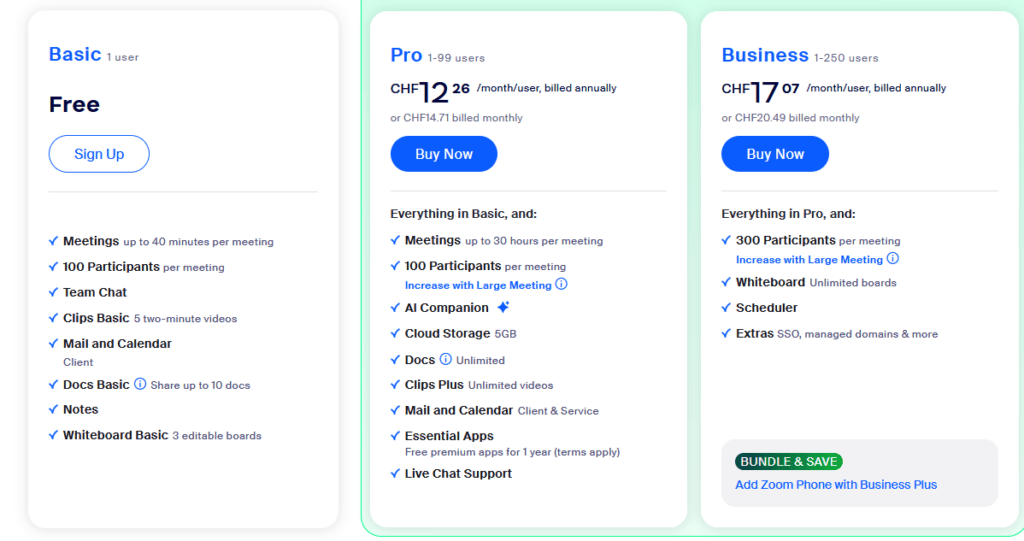
Zoom, for its part, offers a free version that is even more limited than Microsoft’s free version, and several subscription plans :
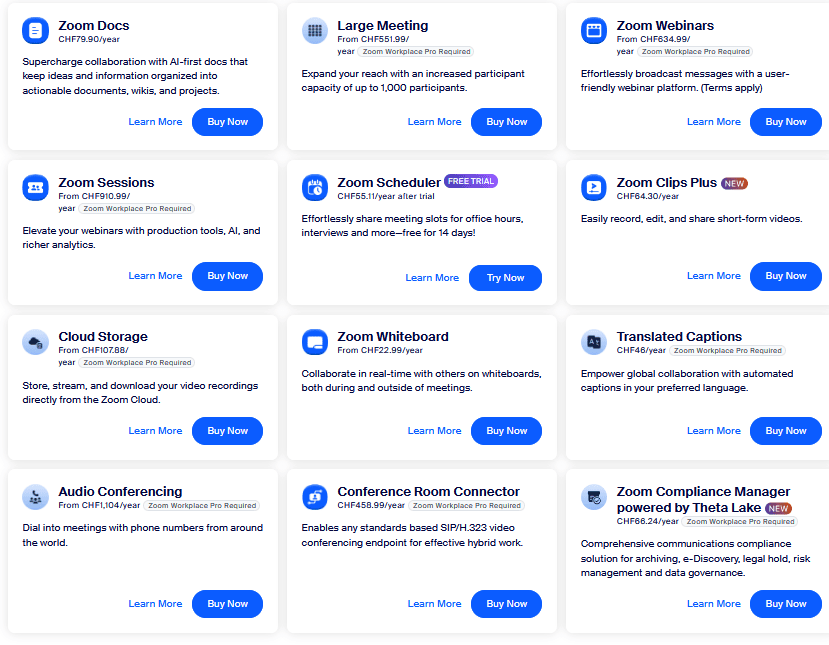
Zoom also offers several add-ons for different use cases :
Both applications are complete video call solutions, but they are not perfect. They are not free, the servers are located on the other side of the world, and above all, they are not customizable. We can do better. We present Jitsi.
Jitsi is an open-source, free video conferencing and video call platform. It can be self-hosted, which guarantees full control over every aspect of the software and its security. The main application is encrypted. Accessible from mobile and desktop, you can join a call without an account. If it is self-hosted, it is fully customizable and offers the same features as the applications already mentioned. You can also access it from https://meet.jit.si/. And if you want a solution whose servers are based in Switzerland, there is Free-Solutions Meetings. There are no time or participant-number restrictions.

Jitsi interface
The only drawback is that setting up Jitsi on a personal server can be a bit complicated if you are not particularly familiar with it. The online version is nevertheless always available: https://meet.jit.si/ , but ayutec can always help you set up your own Jitsi service.
In conclusion, Zoom and Teams, although very good integrated solutions, do not offer as many usage options as Jitsi, have fewer customization options, and can prove costly if they are used only as pure video conferencing software without using the other features on offer, such as Office suite integration for Teams.